Water Treatment Lab
An OT/ICS cybersecurity lab using OpenPLC, Ignition, Modbus/TCP, Kali Linux, Wireshark, and UFW
Since beginning my studies in cybersecurity I have been fascinated by learning about security for critical infrastructure and specifically, water security. There is nothing more important to communities than access to a clean, reliable water supply and the fact that some water systems are vulnerable to cyber attacks is viscerally frightening to me. In addition, the news that Iran had attempted to hack US water systems recently made me feel this was more urgent than ever.
I wanted to see how an attack could affect a water treatment plant firsthand, so I set up my own water treatment plant and attacked it.
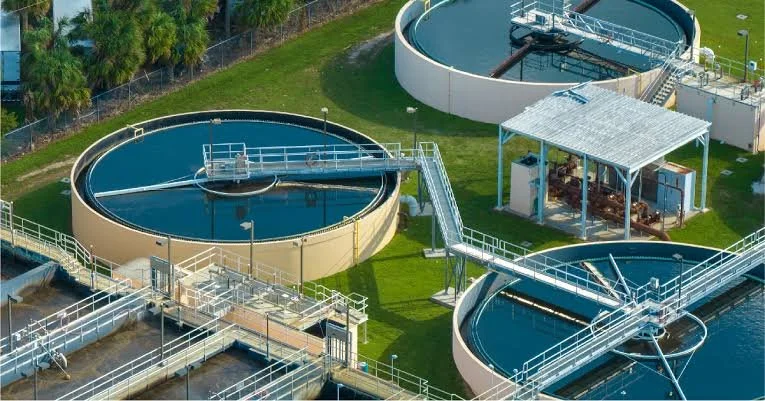
Nice Water Treatment Plant. I hope nobody hacks it for educational purposes.
What I built
I studied on RealPARS how to construct a basic water treatment plant in OpenPLC on my Ubuntu virtual machine. This included elements such as an intake pump, outlet pump, tank filling and draining simulations, time logic, alarms for high/low levels, a pump conflict alarm and a general system alarm. I constructed it using a ladder diagram in OpenPLC.
I set a rule that the tank would fill up using the intake pump until it reached 80% full and would then drain using the outlet pump until reaching 20% full. The process would then repeat indefinitely.
After building out the control logic in OpenPLC I used Ignition to create a Human-Machine Interface which allowed me to monitor all the states in one place.
I set up a Kali VM to act as the attacker, we will get to that more later.
OpenPLC runs the control logic. Ignition provides the HMI so I can watch the tank, pump states, alarms, and tank-level history. The Kali Linux VM acts as the attacker/security-testing machine, and Wireshark lets me capture and inspect the Modbus/TCP traffic.
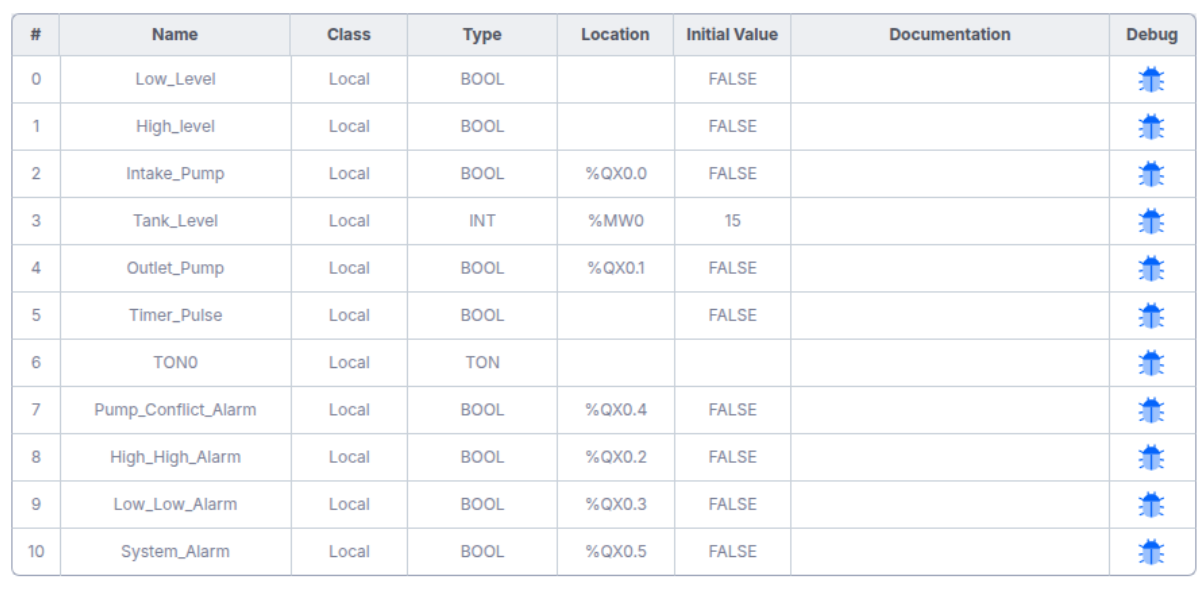
PLC Variables and Input/Output Mapping
Tools used
OpenPLC
Ignition HMI/SCADA
Modbus/TCP
Kali Linux
mbpoll
Wireshark
Ubuntu
UFW
VMware Fusion
Making the process behave like a plant
Before I could attack the plant I needed to set a predictable baseline state. I set a rule that the tank would fill up using the intake pump until it reached 80% full and would then drain using the outlet pump until reaching 20% full. The process would then repeat indefinitely.
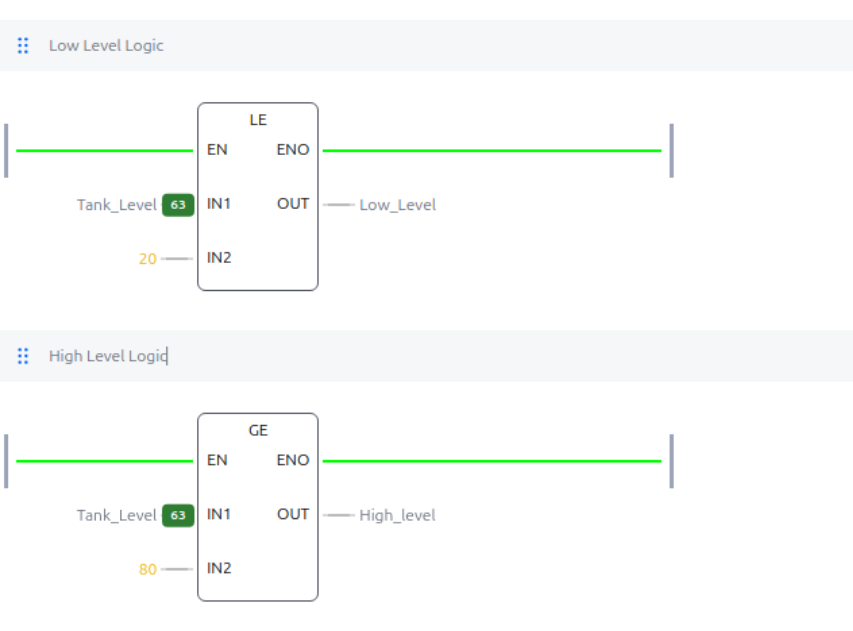
OpenPLC low- and high-level detection. Tank_Level <= 20 sets Low_Level; Tank_Level >= 80 sets High_Level.
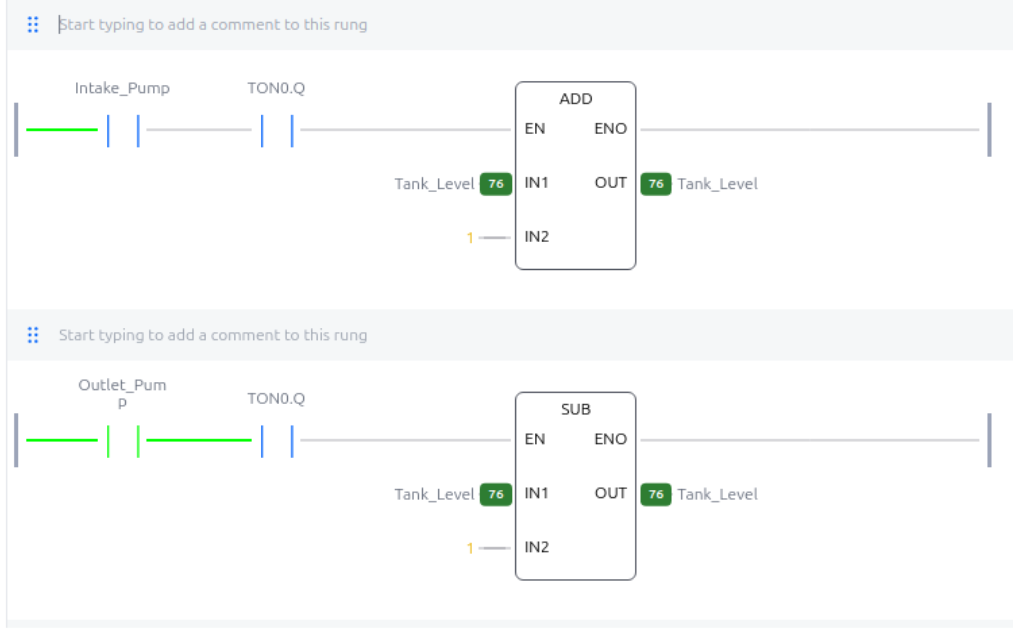
Tank Fill Simulation and Tank Drain Simulation rungs. These model the physical effect of the two pumps on Tank_Level.
Establishing a baseline
Once I had everything working I observed several cycles to make sure everything worked as expected. The tank fluctuated between 20% and 80% with one pump working at a time. No alarms were triggered. I checked between Ignition and OpenPLC to ensure they were getting the same readings.
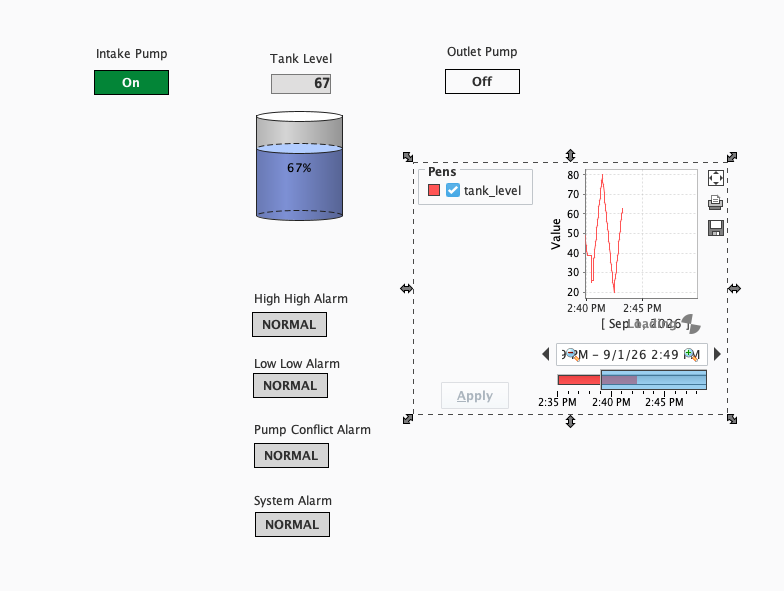
The Ignition HMI during normal operation: one pump running, the other off, alarms normal, and the tank level cycling.
Then I tested the weak point: Modbus access
After all the setup I got to the fun part: the attack!
I began with reconnaissance. I used mbpoll, a command-line Modbus client from my Kali VM to query the Modbus/TCP service on the Ubuntu VM. I used Wireshard to inspect the Modbus traffic between the VMs. I monitored the tank levels and viewed which pump was on at which time. I confirmed the information I was getting was accurate in the Ubuntu VM.
Once I was confident that I was viewing the correct information about the water treatment plant it was time to go on the offensive. I used mbpoll to send a Modbus register write that would immediately change the tank value to 60. This confirmed that I was able to modify the data.
After confirming I could modify the tank level, I wanted to see if I could trigger alarms. I wrote a value of 95, above the high-threshold I had set. The PLC responded to my manipulated value and as a result both pumps were activated simultaneously, triggering the Pump Conflict and System alarms.
The system was going haywire. A simple Modbus write had disrupted the intake/outlet process.
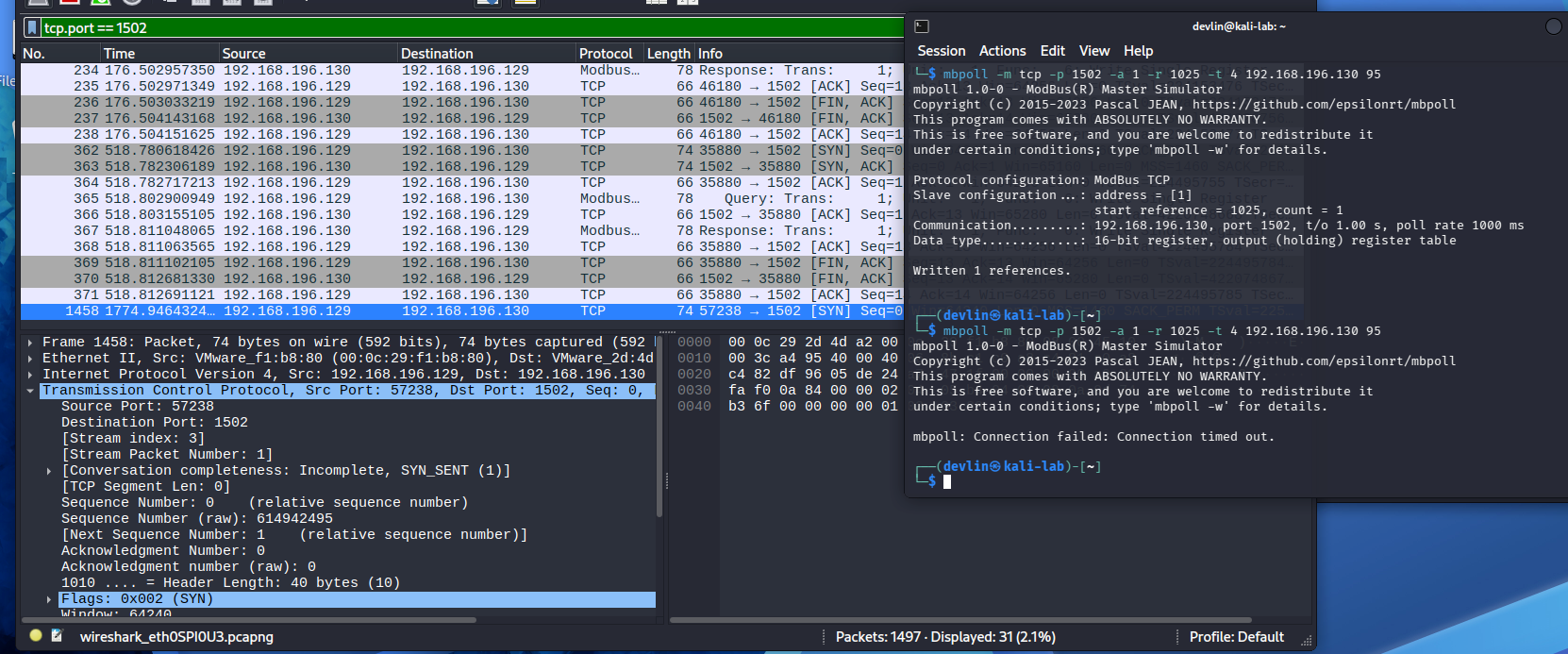
Wireshark and the controlled Modbus register-write test. The write changed the simulated Tank_Level before the PLC logic resumed control.
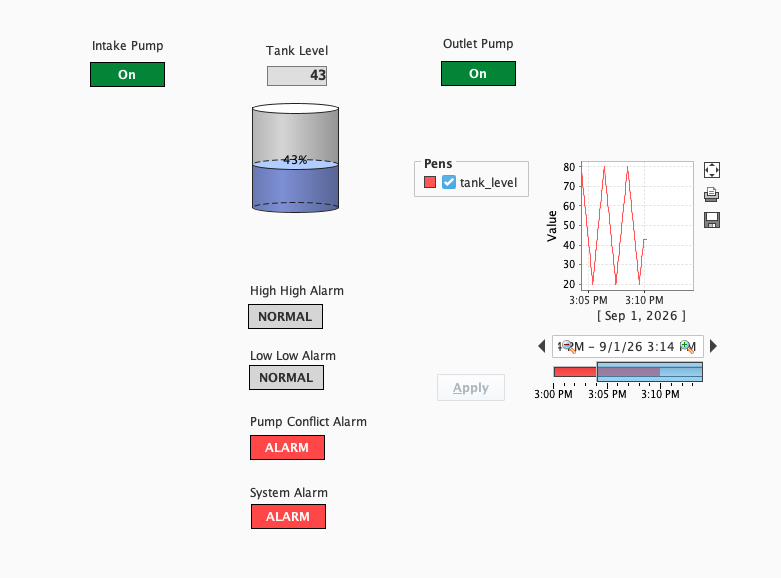
The abnormal state was visible immediately: both pumps were on and the Pump Conflict and System alarms were active.
Recovery and mitigation
After the successful attack, I returned the system to a normal state and verified in OpenPLC that everything was running smoothly. The tank began cycling normally again, filling up and then draining with one pump active at a time with no alarms triggered.
The security issue was that the Kali VM could access the Modbus service and issue write requests without authentication. Because the PLC accepted the request network access became control access.
To prevent future attacks I added rules banning the 1502 port that the Kali VM used to attack the plant and denied all incoming traffic to the system.
To prevent similar future attacks I used UFW on the Ubuntu VM to block inbound TCP connections to port 1502, where the OpenPLC Modbus/TCP service was listening.
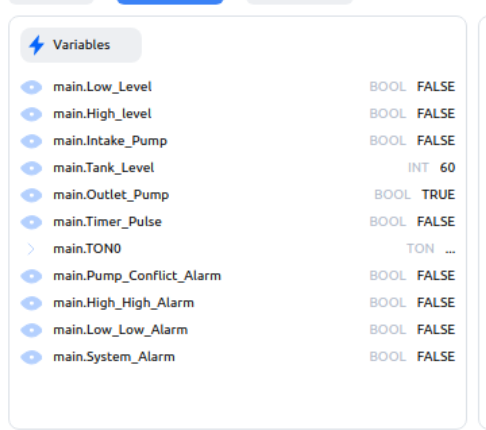
OpenPLC after recovery: Tank_Level is changing again, only the outlet pump is active, and the alarm outputs are false.
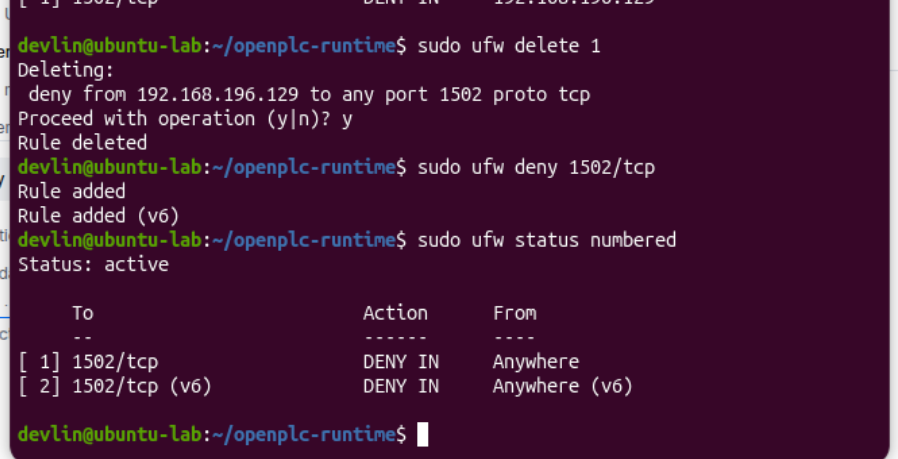
UFW blocking inbound access to the OpenPLC Modbus/TCP service on port 1502.
Did the mitigation actually work?
To test the effectiveness of my firewall I tried executing the same command from my Kali machine that had made my treatment plant go haywire previously. Instead of messing with my plant, I got a quick Connection failed message. The firewall was effective in blocking my attacker (me).
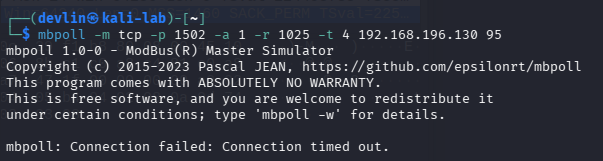
After mitigation, the Modbus request from Kali times out instead of reaching OpenPLC.
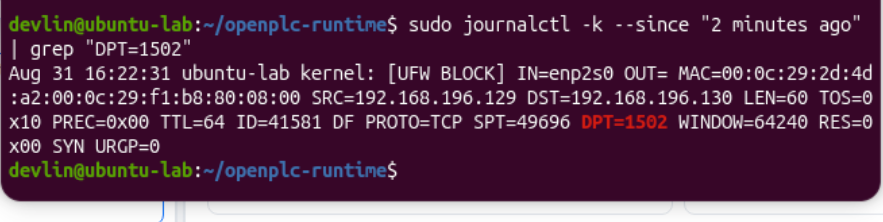
The Ubuntu firewall log records the blocked connection attempt to TCP/1502.
Lessons learned
In OT security, a network event can translate into a process change. That makes understanding the normal physical/process state just as important as understanding the packets.
A baseline made the attack easier to recognize. I knew what the pumps, tank level, trend, and alarms should look like before I changed anything.
Industrial protocols such as Modbus/TCP need protection around them. Limiting which systems can reach the PLC dramatically reduced the attack surface in this lab.
Detection is more useful when network telemetry and process telemetry can be viewed together. Wireshark showed the command; Ignition showed the consequence.
Recovery matters as much as blocking the attacker. I verified that automatic control had actually resumed rather than assuming the process was fixed.
Next steps
I am going to continue developing this lab. My next steps will be to create network segmentation, more realistic allowlisting and improve OT specific monitoring and alerting.
For this proof of concept, I blocked all inbound access to TCP/1502. In a real OT environment, simply blocking the service would likely interfere with legitimate communications, so a better approach would be to allow only authorized HMI/engineering systems to communicate with the PLC.